
Personal Safety Prep

PersonalSafetyPrep.com

  • Home
  • Categories
    • Self-Defense Tools
    • Pepper Sprays
    • Less Lethal Devices
    • Safes
    • Kits
    • Auto Safety
    • Emergency Gear
  • Situational Awareness
  • Online Safety
May 12.2026
1 Minute Read

The Privacy Hack: 3 Safe Ways to Share Photos Without Revealing Your GPS Location

Over 80% of photos shared online unknowingly reveal their GPS location, putting your privacy at risk. Discover three simple, safe ways to share your photos without exposing where you are, keeping your personal moments protected from unwanted eyes.
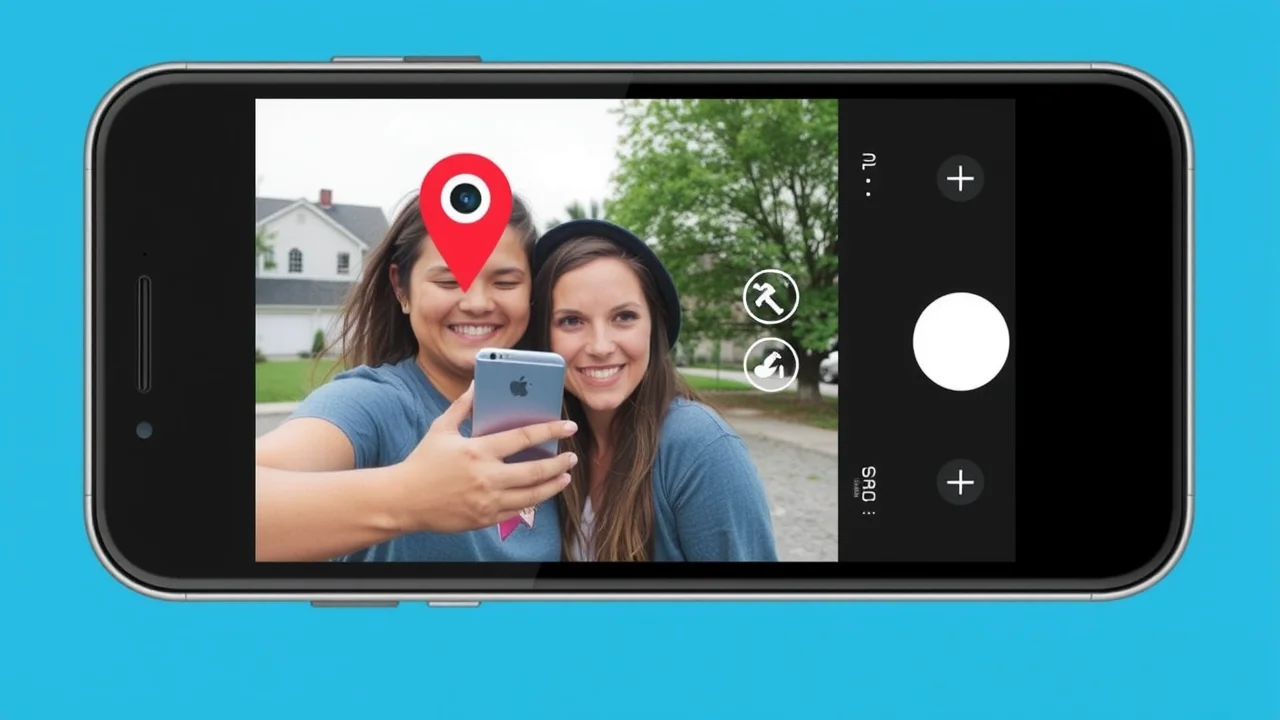
Protect Your Privacy: Why Safe Ways to Share Photos Without Revealing GPS Location Matter

Every time you share photos online, you could be revealing far more than just a moment in time. Modern digital photos embed extra details—like GPS coordinates and location tag—directly in the image file's exif data. Hackers, advertisers, or even strangers on social media can easily access this info, tracking your locations or piecing together sensitive parts of your daily life.

This is why learning safe ways to share photos without revealing GPS location is critical for everyone, from teens to professional photographers. Protect your privacy and ensure your pictures remain a source of joy, not a risk to your personal info.

  • What You'll Learn:

  • Understand exif data and location tags in digital photos

  • Recognize the privacy risks when you share photos with location metadata

  • Step-by-step methods to remove exif data and location tags

  • How to use editing tools and trusted photo services for privacy

  • Expert advice for keeping your personal information safe when sharing photos

The Risks: How Exif (Exchangeable Image File Format) Data and Location Tags Expose Personal Information

Cautious young woman examining a smartphone, searching for hidden exif data and location tags in digital photos

What is Exif Data?

EXIF data, or Exchangeable Image File Format data, is a standard that stores metadata within image files, particularly photographs taken by digital cameras and smartphones. This metadata includes important information such as the camera make and model, exposure settings (shutter speed, aperture, ISO), date and time the photo was taken, and sometimes even GPS coordinates that indicate where the picture was captured.

More than just technical details, EXIF data can enhance the storytelling potential of an image by providing context about how and where it was created. This information can be especially useful for photographers who wish to analyze their work or for anyone looking to organize and manage their photo collections more efficiently. However, it's worth noting that sharing images online can expose sensitive data like location details, so it's wise to manage EXIF data carefully, especially when privacy is a concern.

Understanding Exif Data and Location Metadata in Photos

Whenever you snap a picture using your smartphone or digital camera, it often saves much more than just the visible image. Hidden beneath your picture is a wealth of embedded data—known as exif data (Exchangeable Image File Format)—that details where, when, and how your image was taken. This metadata can include camera settings, device type, timestamp, and, most importantly, location metadata from GPS sensors.

For example, an ordinary family photo may contain your exact home address coordinates, allowing anyone who receives or accesses your image file to see where you live, work, or spend time. When you share photos, especially on public or semi-public platforms, this invisible layer can unintentionally share your most private details with the world.

How Personal Info Is Embedded in Digital Camera and Smartphone Images

Personal info like your precise GPS coordinates, device identifiers, and even network information is often stored in the exif data attached to your photos. Most camera apps and default phone settings enable location tagging by default. As a result, images sent via email, posted to social media, or uploaded to a photo sharing site may contain sensitive personal information about your movements and routines.

This can be exploited by cybercriminals for location tracking or used by companies for targeted advertising. Even seemingly harmless actions—such as sharing vacation snaps or “just taken” selfies—can unintentionally reveal your location to strangers or malicious actors online.

"Many people are surprised to learn that every photo they take holds hidden details about their location." — Dr. Evelyn Cardona, Privacy Researcher
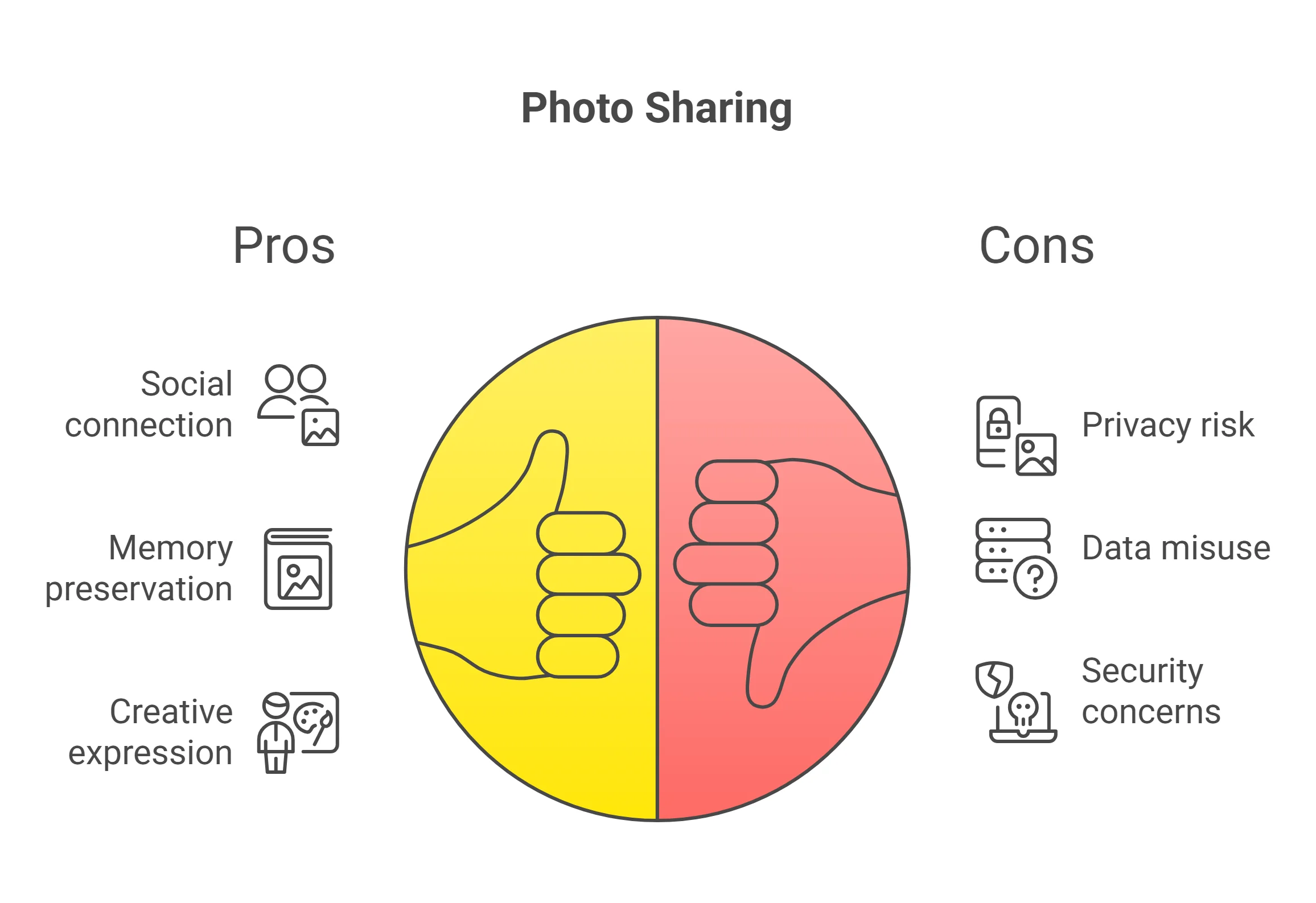
Real-World Privacy Risks of Sharing Photos Online

Imagine sharing a birthday party photo on a social network—only to have someone you don’t know show up weeks later in the very park where you celebrated. Real-life scenarios have shown that criminals, stalkers, or fraudsters can analyze the exif data from widely shared images to determine your exact location and routine patterns.

Even celebrities have faced security breaches by posting geotagged photos. For everyday users, this means every public post or message could potentially broadcast your whereabouts and risk your safety. Recognizing these threats is the first step in practicing safe ways to share photos without revealing gps location.

Safe Way #1: Remove Exif Data and Location Metadata Before Sharing Photos

How to Remove Exif Data Using Photo Editing Tools

The most direct way to protect your privacy when you share photos is to remove exif data—including GPS coordinates and location tag—before sharing your images. Dedicated photo editing tools allow you to strip away metadata from your photos, leaving only the visible image and nothing more. Many modern editing tools and apps provide a “remove metadata” option in just a few clicks, making it straightforward to safeguard your location and other sensitive information prior to uploading, emailing, or posting.

Adult using photo editing tools to remove exif data and location tag before sharing photos

List of Editing Tools that Help Remove Location Data (Windows, Mac, Mobile)

There are plenty of excellent editing tools for removing location data from photos, whether you’re on a Windows PC, Mac, or mobile device. For Windows, tools like Microsoft Photos and third-party options such as Exif Pilot or IrfanView offer quick metadata removal.

Mac users can leverage Preview or download apps like ImageOptim for more control. On mobile devices, apps like Photo Metadata Remover (Android) and Metapho (iOS) make the task simple with just a few taps. These photo editing solutions help ensure your pictures are cleaned of location metadata before leaving your device.

"Always double-check your image's metadata before uploading any personal pictures." — Jamie Lee, Cybersecurity Specialist

Comparison of Popular Editing Tools for Removing Exif Data

Tool Name

Platform

Removes Location Data

User-Friendly?

Microsoft Photos

Windows

Yes

Yes

ImageOptim

Mac

Yes

Yes

Exif Pilot

Windows

Yes

Moderate

Metapho

iOS

Yes

Yes

Photo Metadata Remover

Android

Yes

Yes

Safe Way #2: Disable Location Services When Taking Photos

Teen disabling location services on smartphone to protect privacy when taking photos

How to Disable Location Tag on Smartphones and Digital Cameras

If you want to stop recording location data as soon as you snap a picture, consider disabling location services or turning off location tag for your camera. On iOS, go to Settings > Privacy > Location Services > Camera and select “Never. ” For Android, visit Settings > Apps > Camera > Permissions and disable Location Access.

Most modern digital cameras also allow you to turn off GPS tagging via their menu. This proactive step ensures new images never have embedded GPS coordinates at all, eliminating the need for later removal and giving you confidence whenever you share photos with others.

Tips to Ensure No Location Data Is Captured

Don’t rely on just toggling off a single setting. Double-check your camera app or system settings after updates, as permissions may reset. Turn off location services globally if you want total peace of mind. Remember that third-party or social media apps can request location access independently, so routinely audit all app permissions associated with your photos.

Some people choose to use older devices or cameras without GPS features to guarantee no location metadata is ever recorded. Whatever your method, regularly reviewing your device’s privacy settings is essential for protecting your privacy.

Devices and Brands with Location Services Settings

  • Apple iPhone/iPad (iOS): Disable under Camera in Location Services

  • Android smartphones/tablets: Camera app permissions in Settings

  • Samsung Galaxy Series: Built-in camera settings

  • Canon, Nikon, Sony digital cameras: Disable GPS/geo-tagging in main menu

  • Google Pixel: Google Camera app permissions

"Disabling location services is the first and most important step to protect your privacy." — Marcus Allen, Data Protection Officer

Safe Way #3: Use Secure Photo Sharing Services to Protect Personal Information

What to Look for in a Secure Photo Service

Not all photo sharing or messaging apps treat your privacy equally. To maximize safety, choose a photo service that either automatically removes location data from uploaded images, uses end-to-end encryption, or strictly limits who can view your photos. Look for clear privacy settings, transparent data practices, and user controls over metadata.

Services or apps that prioritize user privacy typically avoid collecting your personal information or sharing it with advertisers. Reading a service’s privacy policy or looking for independent privacy certifications can help you make informed choices with your moments and metadata.
Friends using encrypted photo app to share photos without revealing gps location

Recommended Privacy-Focused Photo Sharing Platforms

  • Signal – Encrypted messaging, removes most metadata by default

  • Proton Drive – Secure file/photo storage with Swiss privacy laws

  • Apple iCloud Shared Albums (when set correctly) – Strip some metadata, private links only

  • Nextcloud – Self-hosted sharing, powerful privacy controls

  • Telegram (Secret Chat) – End-to-end encrypted and erases most embedded data

How to Share Photos Privately via Encrypted Messaging Apps

Private, encrypted messaging apps like Signal and Telegram are among the safest ways to share photos without revealing gps location. When you attach and send a photo, these apps usually strip away unwanted exif data, and end-to-end encryption ensures that only your intended recipient can access what's sent.

This protection surpasses typical social media uploads, where privacy policies may not favor the user. Always double-check app settings to confirm metadata is stripped, and use the “confidential” or “secret chat” options if available. For extremely sensitive images, share via a link or direct encrypted file transfer, rather than group or public channels.
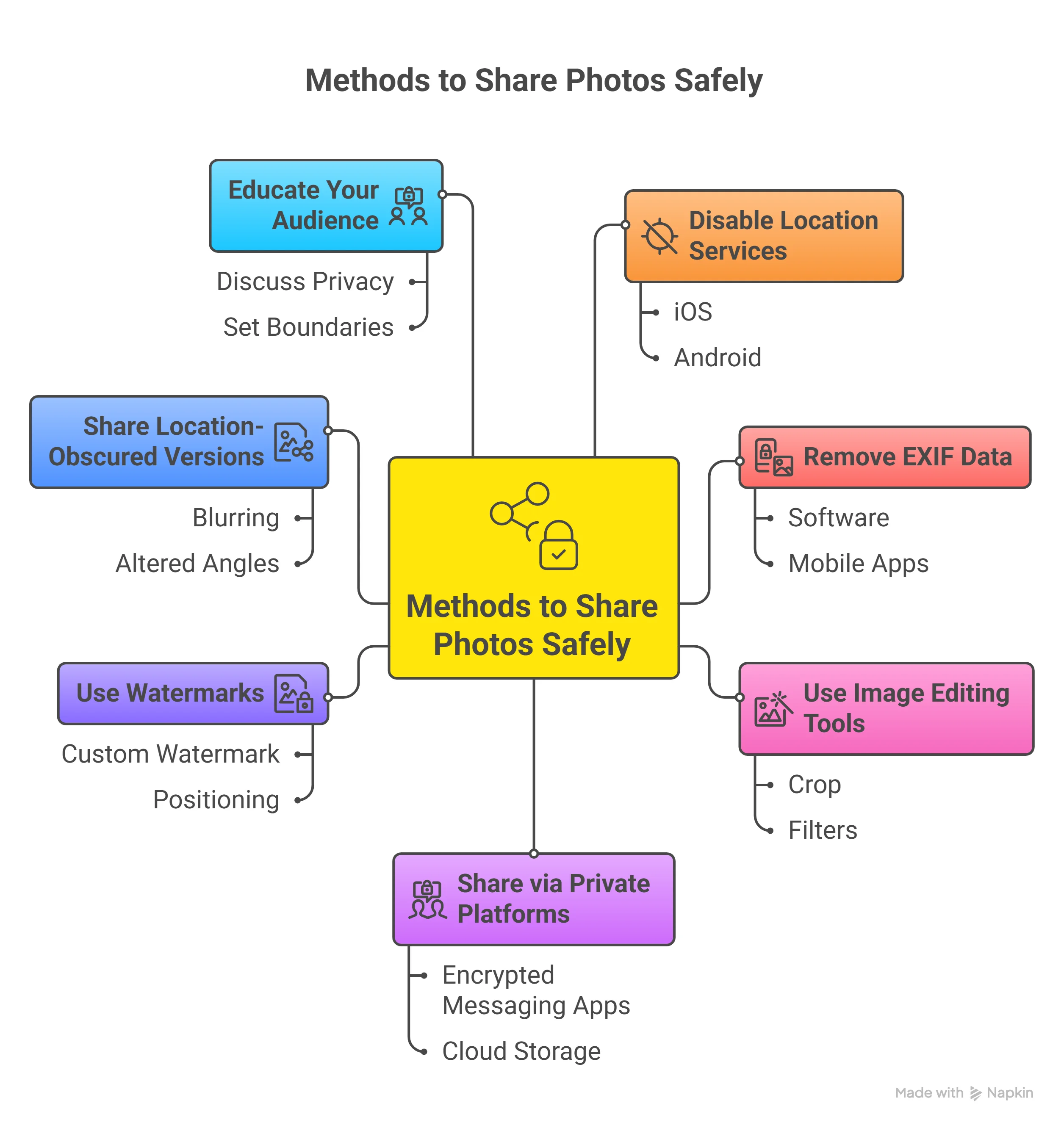
Best Practices for Sharing Photos Without Revealing GPS Location

  • Do’s:

    • Always remove exif and location data before sharing

    • Use editing tools designed for privacy

    • Double-check app and device location services settings

    • Share photos only via privacy-focused photo services or encrypted messaging apps

    • Stay updated about latest privacy features in your favorite platforms

  • Don’ts:

    • Don’t post location-tagged images on public social media profiles

    • Don’t share sensitive or personal moments with large or unknown groups

    • Don’t ignore app permission requests—review and update regularly

    • Don’t rely on default device settings for privacy

    • Don’t forget to advise friends and family about safe sharing habits

Privacy Features Comparison: Photo Editing Tools, Photo Sharing Services, and Messaging Apps

Solution Type

Example

Removes Location Metadata

Encryption

User Controls

Photo Editing Tool

ImageOptim, Metapho

Yes

No

Manual

Photo Sharing Service

Proton Drive, iCloud

Varies

Yes

Yes

Messaging App

Signal, Telegram

Usually

Yes

Yes

People Also Ask: Safe Ways to Share Photos Without Revealing GPS Location

Private user with digital camera reviewing photos, digital privacy overlay, in a sunny park

How to hide location when sharing photos?

Answer: Step-by-step instructions for hiding location data before sharing using editing tools and settings.

Before sharing a photo, use a photo editing tool to inspect and remove exif data and the location tag. On most devices, open the image, select the info or details option, and use “Remove Location” or “Remove Metadata. ” Alternatively, disable location services in your camera settings to prevent GPS information from being stored in the first place. Always verify that the image no longer contains location metadata prior to posting or sending it online.

How to send a photo without location info?

Answer: Remove exif data or use apps that strip metadata before sharing.

To send a photo without revealing your location, first remove exif and location data with dedicated editing tools like Metapho or ImageOptim. If using a messaging app such as Signal or Telegram, check that the privacy settings are configured to strip metadata automatically. This ensures that when you share photos, recipients only see the image—not your personal info or private location details.

How to share location with someone without notifying them on iPhone?

Answer: Share via private messaging apps or disable location sharing permissions before sending.

If you want to share your location discreetly, avoid adding geotags to photos or using public social media. Instead, share via a private messaging app with encrypted channels, or send a direct message after disabling all location sharing and app permissions. Always check privacy settings before sharing any personal information.

Can others see my location from my photos?

Answer: If exif data is intact, yes—always check and remove before public sharing.

Yes, if the exif data and location metadata remain attached, others can view your GPS coordinates and potentially deduce your whereabouts from any shared images. Always make it a routine to remove location info before sharing, especially on public or semi-public platforms, to maintain your privacy and protect personal security.

FAQs: Safe Ways to Share Photos Without Revealing GPS Location

Can social media platforms automatically remove exif data from uploaded photos?

Some major social media platforms, like Facebook and Instagram, do remove certain metadata, including GPS location tags, from images when they’re uploaded. However, not every platform or photo service offers this protection. Private sharing, file attachments, or lesser-known sites may still expose your personal information. It’s always wise to remove metadata on your own before upload for maximum safety.

Is there a difference between removing exif data and disabling location services?

Yes, these are different steps. Removing exif data means cleaning location tags and hidden information from an image after it’s been taken. Disabling location services means preventing your camera or phone from ever saving that information in the first place. For the highest privacy, do both: disable location tagging on your device and remove exif data before sharing your photos.

Which photo service is safest for privacy-conscious users?

Services that employ end-to-end encryption, allow direct control over sharing permissions, and avoid collecting or selling user data are best. Signal, Proton Drive, and private albums on iCloud are among the safest options for those concerned about personal info exposure. Always check a service’s privacy policy and user reviews before choosing where to share photos.

Key Takeaways: Sharing Photos Safely Without Revealing GPS Location

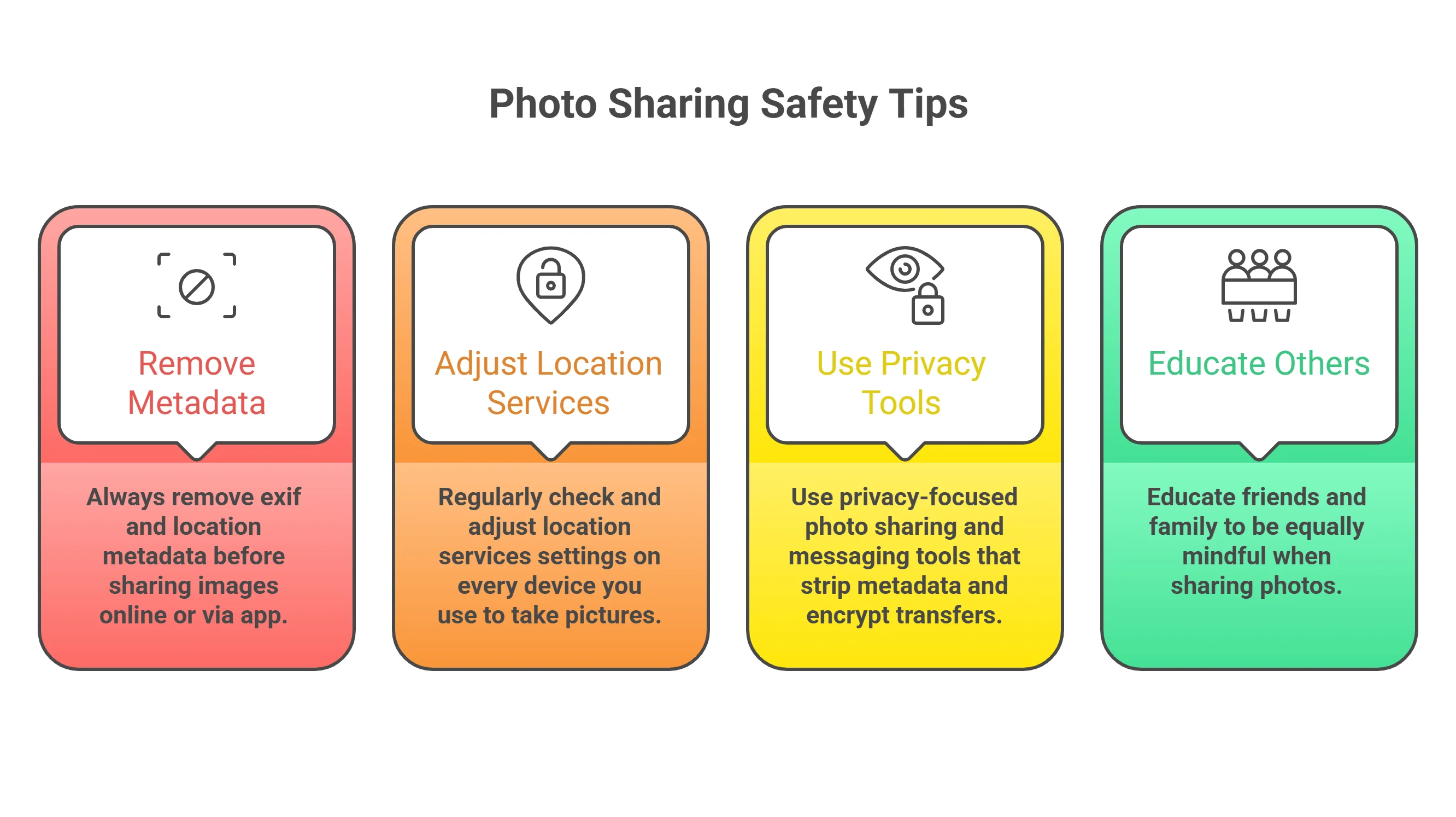
  • Always remove exif and location metadata before sharing images online or via app.

  • Regularly check and adjust location services settings on every device you use to take pictures.

  • Use privacy-focused photo sharing and messaging tools that strip metadata and encrypt transfers.

  • Educate friends and family to be equally mindful when sharing images containing personal information.
Final Thoughts: Embrace Safe Ways to Share Photos Without Revealing GPS Location

Stay vigilant and keep your personal moments private with responsible photo sharing.

For more expert privacy solutions and updates, visit PersonalSafetyPrep.com — Your Trusted Source

Sources:

  • Privacy.org – https://www.privacy.org/photo-metadata-explained/

  • Sophos Naked Security – https://nakedsecurity.sophos.com/2022/06/15/photos-can-reveal-your-location-how-to-remove-metadata/

  • Proton Blog – https://proton.me/blog/remove-photo-metadata

  • Apple Support – https://support.apple.com/en-us/HT207092

  • Signal Blog – https://signal.org/blog/signal-and-metadata/

  • Android Central – https://www.androidcentral.com/how-remove-location-your-photos

To enhance your understanding of safeguarding your privacy when sharing photos, consider exploring the following resources:

“How to Stop the Photos You Share From Giving Away Your Exact Location” (howtogeek. com) This article provides comprehensive steps to remove location data from photos across various platforms, including Windows, macOS, iOS, and Android, ensuring your shared images don’t disclose your whereabouts.

“Safe Ways to Share Images Online Without Compromising Privacy” (sejda. in) This guide delves into the risks associated with sharing images online and offers practical methods to strip metadata, disable location tagging, and choose secure platforms for sharing photos without exposing personal information.

By consulting these resources, you’ll gain valuable insights into protecting your privacy while sharing photos online.

PersoanlSafetyPrep.com

Online Safety

0 Comments

Write A Comment

*
*
Please complete the captcha to submit your comment.
Related Posts All Posts

Deepfake Video Call Protection: How to Verify Your Family Members’ Identity in 2026

In a world where deepfake video calls can deceive anyone, protecting our loved ones is more than just a technical challenge—it’s a personal mission. Understanding how to verify these calls ensures you’re truly connecting with family, keeping trust alive and safeguarding your most precious relationships.With the dramatic rise in deepfake scams powered by artificial intelligence (AI) and sophisticated voice cloning, the security of video calls among family members faces urgent threats.In 2026, learning how to verify deepfake video calls from family members has become essential for protecting your privacy, preventing identity theft, and ensuring your family's digital trust. This comprehensive guide gives you reliable, step-by-step methods to spot and counter deepfake scams so you can stay connected and safe in an AI-driven world.“Scammers can now create realistic fake faces and voices to mask their own in real time.” — Cybersecurity expert, quoted by WIREDWhy Verifying Deepfake Video Calls from Family Members MattersThe emergence of convincing deepfake video and AI voice technologies has significantly changed digital communication. While enabling easier connections, these developments have also ushered in a new era of deepfake scams that target families. Scammers exploit video call platforms, impersonating loved ones with audio or video that’s nearly indistinguishable from the real thing.This puts your family’s personal information, finances, and emotional security at risk. Failure to verify the authenticity of a video call from a family member can result in fraudulent requests for wire transfers or the theft of sensitive information—making the stakes alarmingly high in 2026.Cybercriminals are continually refining their approaches, often using social engineering—the art of manipulating trust to steal personal data. Deepfake video calls present a powerful tool in the hands of malicious actors. Understanding the red flag signs of a fake video or voice scam, and learning how to act decisively in real time, ensures your connections remain genuine and you stay one step ahead of identity theft tactics. Verifying deepfake video calls is not just about technical savvy—it's about empowering your family with essential security awareness in a changing digital landscape.What You'll Learn About How to Verify Deepfake Video Calls from Family MembersKey threats deepfake scams pose in 2026Advanced warning signs of a fake videoStep-by-step methods for deepfake video call verificationThe influence of artificial intelligence and AI voice technologiesBest practices for safeguarding against deepfake scamsThe Evolution of Deepfake Video Calls and Artificial IntelligenceFrom Simple Manipulation to Advanced Deepfake ScamsYears ago, simple video manipulation involved basic editing tricks and obvious audio dubs. Fast-forward to 2026, and deepfake scams now leverage cutting-edge artificial intelligence to create AI voice and fake video content so advanced it can easily deceive even digitally savvy people.Video calls, once a trusted means of staying close, are now common targets for scammers wielding AI-powered voice cloning and video deepfake technology. This evolution means that visual and auditory cues—once reliable markers of authenticity—can no longer be trusted at face value.Today’s deepfake video calls use neural networks to model face movements and replicate a person's speech patterns, gestures, and tics. Using personal information found on social media or previous video calls, malicious actors can fabricate highly persuasive video deepfakes that challenge our ability to spot a deepfake.With easy access to AI voice and video call software, a scammer can create convincing impersonations of your family members, raising the risk of identity theft, wire transfer fraud, and emotional manipulation through fake video or voice scams.Role of Artificial Intelligence and AI Voice in Video CallsArtificial intelligence and AI voice cloning algorithms are driving forces behind the most convincing deepfakes. These systems, trained on enormous datasets of audio or video, learn to simulate practically anyone’s likeness in a video call. As a result, a deepfake scam can now involve not just a face, but also a perfectly matched, cloned voice that even close family members might find hard to recognize as fake. AI voice systems can replicate inflection, emotion, and speech cadence, making real-time voice scams increasingly common and harder to detect.With cloud-based delivery and open-source platforms for voice cloning, anyone with basic technical skills can now attempt to stage a convincing deepfake video call. This democratization of AI has increased the incidence of deepfake scams targeting family members, friends, and businesses alike. In these scenarios, reliance on just visual authentication or recognizing a familiar voice is no longer enough—families must embrace layered security strategies to outpace rapidly advancing artificial intelligence threats.As you strengthen your defenses against deepfake video call scams, it's equally important to consider your overall digital privacy habits. For a deeper dive into practical steps that enhance your online safety and reduce exposure to emerging threats, explore the actionable advice in the ultimate guide to online privacy protection. Integrating these privacy strategies can further minimize the risk of personal data being used in deepfake attacks.Identifying Red Flags in Deepfake Video Calls from Family MembersCommon Red Flag Indicators of a Deepfake ScamSpotting a deepfake scam during a video call requires close attention to details that may seem out of place. Warning signs often include unusual speech patterns or delays due to AI voice glitches, low-quality or lagging video with fake video inconsistencies, and unexpected requests for sensitive information. Since deepfake video calls depend on both visuals and audio, inconsistencies between lip movement and voice, robotic or emotionless tone, or odd pauses can indicate the use of AI voice cloning.Other common red flag behaviors may involve background discrepancies—such as an unfamiliar room behind your supposed family member—or awkward gestures that appear unnatural. If the caller urges you to keep the conversation secret, shows an atypical urgency to secure a wire transfer, or asks for private personal info, it’s vital to hit pause and start the verification process immediately. Real family members rarely pressure you for urgent action via unfamiliar channels, especially through newly found social media contacts or unexplained phone numbers.Unusual speech patterns or delays (AI voice anomalies)Low-quality or lagging video (fake video inconsistencies)Unexpected requests for sensitive informationSuspicious Behavior and Social Engineering TacticsScammers exploiting deepfake video call technology often rely on social engineering to manipulate their targets emotionally or psychologically. By mimicking a family member’s distress or urgency, attackers attempt to bypass logical decision-making and leverage your trust. Watch out for callers who rush you, claim emergencies, or try to evoke fear, guilt, or excitement to extract sensitive information or money. Such tactics manipulate human nature, making you more prone to overlook technical red flag indicators.Social engineering isn’t limited to emotion-based ploys. Attackers may piece together personal details from previous conversations, emails, or social media, making the deepfake scam even more believable. They’ll use plausible stories that match your recent life events or reference mutual contacts to encourage compliance. By staying alert to both technical and psychological signs, you’ll be far more prepared to thwart attempts at identity theft, financial fraud, and voice scams during fake video calls.“The deepfake (voice call or video) builds credibility, making it easier to manipulate the victim into taking action, such as sharing sensitive information, approving payments, or sending money.” — ExpressVPN security analysisStep-by-Step: How to Verify Deepfake Video Calls from Family MembersLive Authentication Techniques During a Video CallWhen a suspicious video call comes through, act immediately to confirm your family member’s identity. Ask spontaneous, personal questions—choose topics only your real relative would know about, such as childhood memories or inside jokes. During the call, request specific gestures or actions (“Please touch your left ear” or “Show me your favorite mug in the room”) to test the real-time capability of the video stream. AI-generated fake video struggles with live, unpredictable movement and on-demand physical interaction.In addition, observe the background details: is the setting consistent with your knowledge about where your family member is supposed to be? If you spot inconsistencies, such as new furniture or missing family photos, this could signal a fake video. Keep the conversation going just long enough to ask questions that are hard to pre-fabricate. Once you detect any misalignment or hesitation, don’t share sensitive information and end the call if conversation becomes suspiciously evasive or forceful.Ask spontaneous, personal questionsRequest specific gestures or actionsVerify unique background detailsTechnical Tools for Deepfake Scam DetectionTechnology can be your ally in the fight against deepfake scams. Leverage face and voice recognition apps that analyze video and audio characteristics to spot evidence of AI manipulation. Real-time deepfake analysis tools scan for inconsistencies, such as unnatural blinking, lip-sync errors, or voice modulation.These technical solutions help you catch the subtle differences between a real video call and a fake one—especially if you’re unsure about your own ability to spot a deepfake using intuition alone.For the most secure verification, use encrypted identity verification methods. Many families now use secure codes, passwords, or visual tokens—like holding up a particular object—to confirm each other's identity during an urgent or unexpected call. Update these methods frequently and keep them private. Combining technical detection tools with personal knowledge makes it much harder for scammers to stage a convincing deepfake video call that leads to fraud or identity theft.Face and voice recognition appsReal-time deepfake analysis toolsEncrypted identity verification methodsCross-verifying with Voice Clone and Voice Cloning EvidenceOne advanced verification step is to cross-verify suspicious calls using past voice recordings or video clips of your family members. AI-powered voice cloning has reached a point where cloned voice and video are alarmingly convincing; therefore, creating a library of genuine, authenticated voice samples can make identifying manipulated content easier.If you suspect you’re witnessing a voice clone during a call, compare the speech patterns, pauses, and emotional tone with previously recorded conversations. Deepfake technology still struggles to replicate true human emotion and improvisation, especially if tested with familiar jokes or playful banter unique to your relationship.In some families, using safe words, phrases, or repeated questions across different platforms (such as following up a video call with a phone call or an encrypted text message) can throw off a scammer using AI voice alone. The aim is to establish multi-layered checks that combine smart use of technology with personal intuition—every layer making it harder for voice scams and deepfake attacks to succeed.“It’s important to note that these scams are not limited to traditional voice calls. They can be carried out over apps like WhatsApp and even increasingly on video call apps like Zoom.” — University of Florida Information TechnologyThe Science Behind Deepfake Video and AI Voice TechnologiesHow Deepfake Video and Fake Video Manipulation OperateDeepfake video utilizes machine learning models—often called generative adversarial networks (GANs)—to map a person’s face and mimic expressions in real time by blending or “swapping” it onto another body. Similarly, AI voice techniques employ deep neural networks to analyze hours of someone’s speech, learning accents, and micro-inflections.The system can then produce artificial, highly realistic audio and video—arming scammers with both tools for a highly convincing deepfake scam. The integration of these AI-powered cloning techniques into video calls is what allows scammers to trick family members into believing urgent requests, risking both personal data and emotional well-being.The alarming part is how accessible and scalable these tools have become. With just a few minutes of your public-facing audio or video—maybe from social media or a voice message—a malicious actor can build a convincing deepfake using open-source AI voice or video platforms. This underlines the need for robust security awareness and ongoing vigilance every time you answer a family video call you weren’t expecting.Limitations of Current Deepfake Video Call Detection ToolsDespite ongoing advances, even the best deepfake detection apps and real-time analysis tools are not foolproof. As the technology behind deepfake video calls becomes more refined, distinguishing real from fake is a race between attackers and defenders. Video deepfake artifacts are becoming less common, and voice cloning tools are better at imitating inflection and timing. Most technical tools catch only the less sophisticated attempts, so combining them with personal verification is crucial for effective protection.Regularly educate your family on the limitations of these tools, and avoid relying solely on automated detection. Instead, balance technical defenses with critical thinking, knowledge of each other’s habits, and the best practices outlined in this guide. This human-plus-technology approach ensures you recognize the subtle cues deepfake scams still can’t fake—yet.Best Practices: Protecting Yourself and Family from Deepfake ScamsEducate family about deepfake scam risksEstablish secret codes for urgent situationsRegularly update privacy settingsMake time to regularly talk with family members about the risks of deepfake scams. Share tips about what to watch out for, and run practice drills so everyone’s ready to respond to a suspicious video call. Establishing secret verification codes ensures that if you're ever asked for a wire transfer, personal info, or other sensitive information via call, you can confirm with a trusted family-specific question or phrase.Don’t forget to update social media privacy settings and limit the public sharing of audio or video, which can be exploited for voice cloning or deepfake video manipulation. Consider setting up a family protocol: “If you ever get a scary or urgent video call, confirm the person's identity using a second channel or a pre-agreed code. ”Common Social Engineering Tactics in Deepfake Video CallsWhy Family Members Are Targeted via Deepfake Video CallsFamily relationships are a prime target for social engineering tactics used in deepfake scams. Scammers know that urgency, love, or worry can bypass logic—especially when combined with a convincing deepfake video or AI voice call. They use emotional manipulation, urgency (“I need money now!”), and the impersonation of trusted voices to trick you into revealing sensitive information, transferring money, or letting your guard down. Making security awareness a habit is crucial for every member of your family, from teens to elderly relatives.Emotional manipulationUrgency and pressureImpersonation of trusted voicesCase Studies: Real-World Examples of Deepfake Scams Using Video CallsIncident 1: Targeted attack on elderly family member using AI voice and video call. An elderly grandparent receives an urgent fake video call from a supposed relative requesting help with a fictitious emergency. The AI-generated video and cloned voice are so realistic that the family member nearly transfers funds before realizing small speech hesitations and inconsistent background details—classic red flag indicators of a deepfake scam.Incident 2: Fake video used to request emergency funds. A parent receives a late-night video call from their "child," frantically asking for a wire transfer for a medical bill. The emotional tone is high, but a quick check with a family code through a separate phone call reveals the scam.Verification MethodEffectivenessEase of UseBest forLive question testsHighEasyMost usersDeepfake detection appsModerateMediumTech usersSecure family codesVery HighEasyFamilies with childrenExpert Insights: Staying Ahead of Deepfake Video Call Threats"Continuous education on artificial intelligence and emerging deepfake threats is vital to maintaining digital trust and safety within the family unit."How to Detect Deepfake Video Calls?AnswerDetecting deepfake video calls from family members requires vigilance for red flag behaviors, use of real-time verification methods, and leveraging deepfake scam detection tools. Watch for unnatural facial expressions, poor video quality, and unexpected requests as initial indicators.Can Deepfake Audio Be Detected?AnswerDeepfake audio, often created with AI voice or voice cloning, can be detected using specialized software that analyzes voice anomalies and acoustic patterns, along with contextual awareness about your family member’s typical speech.Is It Possible for Someone to Fake a Video Call?AnswerYes, artificial intelligence now makes it possible for scammers to produce highly realistic fake video calls that mimic your family member’s likeness and voice. Adopting layered verification steps for every unexpected or urgent video call is crucial.How to Detect Deepfake Voices?AnswerDetect deepfake voices by listening for unusual inflections, robotic tones, or lack of emotional depth. Combine active listening with voice recognition and compare with known voice samples whenever in doubt.FAQs on How to Verify Deepfake Video Calls from Family MembersWhat are the main signs of a fake video or deepfake video call?Look for mismatched lip movements, odd pauses, robotic tones, and requests for secrecy or urgent action. Small visual or audio anomalies are often present in deepfake scams.How frequently should family safety protocols be updated?Review your safety codes, privacy settings, and detection tools every few months, or whenever new threats are reported in the media.Are free deepfake detection apps reliable?While some apps provide basic protection, they may not catch the most sophisticated scams. Use them as part of a broader verification strategy, not as your only defense.What is the role of social engineering in deepfake scams?Scammers use psychological tricks and emotional manipulation along with technology to bypass your natural skepticism.How to educate elderly family members about deepfake video calls?Run simple practice sessions. Teach them to pause when unsure and call another family member to confirm before acting on urgent requests.Key Takeaways for Verifying Deepfake Video Calls from Family MembersDeepfake scams are a growing risk, especially targeting families via video calls.Detection requires technical awareness and personal verification steps.Education and regular communication are key defenses.Leveraging both human intuition and AI-based tools is essential.Stay Secure: Next Steps to Protect Your Family from Deepfake Video Call ScamsFor ongoing updates, best tools, and proactive protection strategies, visit PersonalSafetyPrep.com - Your Trusted Source.ConclusionTake a layered approach to verification, regularly update your knowledge, and foster open communication to protect your family from the evolving threat of deepfake video call scams.Staying ahead of deepfake threats means thinking beyond just video calls—your entire digital footprint matters. If you’re ready to elevate your family’s security posture, consider exploring comprehensive privacy strategies that address everything from password hygiene to safe browsing habits.The insights in Click Smarter, Not Harder: The Ultimate Guide to Online Privacy Protection will empower you with advanced techniques to safeguard your identity and personal data across all online interactions. Take the next step and build a holistic defense that keeps your loved ones secure in every corner of the digital world.SourcesNaked Security – https://nakedsecurity.sophos.com/2023/12/12/fake-faces-real-threats-the-latest-in-ai-powered-deepfake-scams/Wired – https://www.wired.com/story/deepfake-scams-guidance-2026/CISA – https://www.cisa.gov/resources-tools/resources/deepfakes-and-synthetic-mediaFederal Trade Commission – https://www.consumer.ftc.gov/articles/how-spot-avoid-common-scamsIn today’s digital landscape, the threat of deepfake video calls has become increasingly sophisticated, making it essential to verify the authenticity of communications from family members. To enhance your understanding and protective measures, consider exploring the following authoritative resources:“BBB Tip: How to Spot a Deepfake and Avoid Scams” (bbb. org) This guide from the Better Business Bureau offers practical advice on identifying deepfake videos and audio, highlighting common signs such as unnatural facial movements and audio inconsistencies.“How to Detect Deepfake Videos Like a Fact-Checker” (politifact. com) Published by PolitiFact, this article provides insights into the techniques used by fact-checkers to spot deepfakes, including tips on analyzing video and audio for authenticity.By delving into these resources, you can equip yourself with the knowledge and tools necessary to safeguard your family against the evolving threat of deepfake video call scams.PersonalSafetyPrep.com

Posting Your Location Could Be Your Biggest Security Risk: Social Media Safety Tips You Need Today

Oversharing online can invite real-world threats. Learn how to protect your privacy, stop live location sharing, and post smarter. Stay safe with these must-know social media tips. #SelfDefense #Cyber

Your Digital Life Has 3 Weak Spots. Here's How to Lock Them Down

Protect your digital life from hackers and scams. Master password management, social media privacy, and online scam avoidance today. #OnlinePrivacy #CyberSafety

©2026 Personal Safety Prep, All Rights Reserved
eyJjb21wYW55IjoiW0NvbXBhbnlOYW1lXSIsImFkZHJlc3MiOiJbQ29tcGFueSBBZGRyZXNzXSIsImNpdHkiOiIgIiwic3RhdGUiOiIgIiwiemlwIjoiICIsImVtYWlsIjoiZW1haWxAZW1haWwuY29tIiwidG9zIjoiUEhBK1BITjBjbTl1Wno0OFpXMCtWMmhsYmlCNWIzVWdjMmxuYmkxcGJpQjNhWFJvSUhWekxDQjViM1VnWVhKbElHZHBkbWx1WnladVluTndPeUI1YjNWeUlIQmxjbTFwYzNOcGIyNGdZVzVrSUdOdmJuTmxiblFnZEc4Z2MyVnVaQ0I1YjNVZ1pXMWhhV3dnWVc1a0wyOXlJRk5OVXlCMFpYaDBJRzFsYzNOaFoyVnpMaUJDZVNCamFHVmphMmx1WnlCMGFHVWdWR1Z5YlhNZ1lXNWtJRU52Ym1ScGRHbHZibk1nWW05NElHRnVaQ0JpZVNCemFXZHVhVzVuSUdsdUlIbHZkU0JoZFhSdmJXRjBhV05oYkd4NUlHTnZibVpwY20wZ2RHaGhkQ0I1YjNVZ1lXTmpaWEIwSUdGc2JDQjBaWEp0Y3lCcGJpQjBhR2x6SUdGbmNtVmxiV1Z1ZEM0OEwyVnRQand2YzNSeWIyNW5Qand2Y0Q0S0NqeHdQanhoSUdoeVpXWTlJbWgwZEhBNkx5OTNkM2N1WjI5dloyeGxMbU52YlNJK2FIUjBjRG92TDNkM2R5NW5iMjluYkdVdVkyOXRQQzloUGp3dmNENEtDanh3UGladVluTndPend2Y0Q0S0NqeHdQanh6ZEhKdmJtYytVMFZTVmtsRFJUd3ZjM1J5YjI1blBqd3ZjRDRLQ2p4d1BsZGxJSEJ5YjNacFpHVWdZU0J6WlhKMmFXTmxJSFJvWVhRZ1kzVnljbVZ1ZEd4NUlHRnNiRzkzY3lCNWIzVWdkRzhnY21WalpXbDJaU0J5WlhGMVpYTjBjeUJtYjNJZ1ptVmxaR0poWTJzc0lHTnZiWEJoYm5rZ2FXNW1iM0p0WVhScGIyNHNJSEJ5YjIxdmRHbHZibUZzSUdsdVptOXliV0YwYVc5dUxDQmpiMjF3WVc1NUlHRnNaWEowY3l3Z1kyOTFjRzl1Y3l3Z1pHbHpZMjkxYm5SeklHRnVaQ0J2ZEdobGNpQnViM1JwWm1sallYUnBiMjV6SUhSdklIbHZkWElnWlcxaGFXd2dZV1JrY21WemN5QmhibVF2YjNJZ1kyVnNiSFZzWVhJZ2NHaHZibVVnYjNJZ1pHVjJhV05sTGlCWmIzVWdkVzVrWlhKemRHRnVaQ0JoYm1RZ1lXZHlaV1VnZEdoaGRDQjBhR1VnVTJWeWRtbGpaU0JwY3lCd2NtOTJhV1JsWkNBbWNYVnZkRHRCVXkxSlV5WnhkVzkwT3lCaGJtUWdkR2hoZENCM1pTQmhjM04xYldVZ2JtOGdjbVZ6Y0c5dWMybGlhV3hwZEhrZ1ptOXlJSFJvWlNCMGFXMWxiR2x1WlhOekxDQmtaV3hsZEdsdmJpd2diV2x6TFdSbGJHbDJaWEo1SUc5eUlHWmhhV3gxY21VZ2RHOGdjM1J2Y21VZ1lXNTVJSFZ6WlhJZ1kyOXRiWFZ1YVdOaGRHbHZibk1nYjNJZ2NHVnljMjl1WVd4cGVtRjBhVzl1SUhObGRIUnBibWR6TGp3dmNENEtDanh3UGxsdmRTQmhjbVVnY21WemNHOXVjMmxpYkdVZ1ptOXlJRzlpZEdGcGJtbHVaeUJoWTJObGMzTWdkRzhnZEdobElGTmxjblpwWTJVZ1lXNWtJSFJvWVhRZ1lXTmpaWE56SUcxaGVTQnBiblp2YkhabElIUm9hWEprSUhCaGNuUjVJR1psWlhNZ0tITjFZMmdnWVhNZ1UwMVRJSFJsZUhRZ2JXVnpjMkZuWlhNc0lFbHVkR1Z5Ym1WMElITmxjblpwWTJVZ2NISnZkbWxrWlhJZ2IzSWdZMlZzYkhWc1lYSWdZV2x5ZEdsdFpTQmphR0Z5WjJWektTNGdXVzkxSUdGeVpTQnlaWE53YjI1emFXSnNaU0JtYjNJZ2RHaHZjMlVnWm1WbGN5d2dhVzVqYkhWa2FXNW5JSFJvYjNObElHWmxaWE1nWVhOemIyTnBZWFJsWkNCM2FYUm9JSFJvWlNCa2FYTndiR0Y1SUc5eUlHUmxiR2wyWlhKNUlHOW1JR1ZoWTJnZ1UwMVRJSFJsZUhRZ2JXVnpjMkZuWlNCelpXNTBJSFJ2SUhsdmRTQmllU0IxY3k0Z1NXNGdZV1JrYVhScGIyNHNJSGx2ZFNCdGRYTjBJSEJ5YjNacFpHVWdZVzVrSUdGeVpTQnlaWE53YjI1emFXSnNaU0JtYjNJZ1lXeHNJR1Z4ZFdsd2JXVnVkQ0J1WldObGMzTmhjbmtnZEc4Z1lXTmpaWE56SUhSb1pTQlRaWEoyYVdObElHRnVaQ0J5WldObGFYWmxJSFJvWlNCVFRWTWdkR1Y0ZENCdFpYTnpZV2RsY3k0Z1YyVWdaRzhnYm05MElHTm9ZWEpuWlNCaGJua2dabVZsY3lCbWIzSWdaR1ZzYVhabGNua2diMllnWlcxaGFXd2diM0lnVTAxVExpQlVhR2x6SUdseklHRWdabkpsWlNCelpYSjJhV05sSUhCeWIzWnBaR1ZrSUdKNUlIVnpMaUJJYjNkbGRtVnlMQ0J3YkdWaGMyVWdZMmhsWTJzZ2QybDBhQ0I1YjNWeUlHbHVkR1Z5Ym1WMElITmxjblpwWTJVZ2NISnZkbWxrWlhJZ1lXNWtJR05sYkd4MWJHRnlJR05oY25KcFpYSWdabTl5SUdGdWVTQmphR0Z5WjJWeklIUm9ZWFFnYldGNUlHbHVZM1Z5SUdGeklHRWdjbVZ6ZFd4MElHWnliMjBnY21WalpXbDJhVzVuSUdWdFlXbHNJR0Z1WkNCVFRWTWdkR1Y0ZENCdFpYTnpZV2RsY3lCMGFHRjBJSGRsSUdSbGJHbDJaWElnZFhCdmJpQjViM1Z5SUc5d2RDMXBiaUJoYm1RZ2NtVm5hWE4wY21GMGFXOXVJSGRwZEdnZ2IzVnlJR1Z0WVdsc0lHRnVaQ0JUVFZNZ2MyVnlkbWxqWlhNdUlGbHZkU0JqWVc0Z1kyRnVZMlZzSUdGMElHRnVlU0IwYVcxbExpQktkWE4wSUhSbGVIUWdKbkYxYjNRN1UxUlBVQ1p4ZFc5ME95QjBieUE4YUdsbmFHeHBaMmgwSUdOc1lYTnpQU0pqYjIxd1lXNTVVR2h2Ym1WVmNHUmhkR1VpUGpFNE5qWXpOelkzT0RNeFBDOW9hV2RvYkdsbmFIUStMaUJCWm5SbGNpQjViM1VnYzJWdVpDQjBhR1VnVTAxVElHMWxjM05oWjJVZ0puRjFiM1E3VTFSUFVDWnhkVzkwT3lCMGJ5QjFjeXdnZDJVZ2QybHNiQ0J6Wlc1a0lIbHZkU0JoYmlCVFRWTWdiV1Z6YzJGblpTQjBieUJqYjI1bWFYSnRJSFJvWVhRZ2VXOTFJR2hoZG1VZ1ltVmxiaUIxYm5OMVluTmpjbWxpWldRdUlFRm1kR1Z5SUhSb2FYTXNJSGx2ZFNCM2FXeHNJRzV2SUd4dmJtZGxjaUJ5WldObGFYWmxJRk5OVXlCdFpYTnpZV2RsY3lCbWNtOXRJSFZ6TGp3dmNENEtDanh3UGp4emRISnZibWMrV1U5VlVpQlNSVWRKVTFSU1FWUkpUMDRnVDBKTVNVZEJWRWxQVGxNOEwzTjBjbTl1Wno0OEwzQStDZ284Y0Q1SmJpQmpiMjV6YVdSbGNtRjBhVzl1SUc5bUlIbHZkWElnZFhObElHOW1JSFJvWlNCVFpYSjJhV05sTENCNWIzVWdZV2R5WldVZ2RHODZQQzl3UGdvS1BHOXNQZ29KUEd4cFBuQnliM1pwWkdVZ2RISjFaU3dnWVdOamRYSmhkR1VzSUdOMWNuSmxiblFnWVc1a0lHTnZiWEJzWlhSbElHbHVabTl5YldGMGFXOXVJR0ZpYjNWMElIbHZkWEp6Wld4bUlHRnpJSEJ5YjIxd2RHVmtJR0o1SUhSb1pTQlRaWEoyYVdObEppTXpPVHR6SUhKbFoybHpkSEpoZEdsdmJpQm1iM0p0SUNoemRXTm9JR2x1Wm05eWJXRjBhVzl1SUdKbGFXNW5JSFJvWlNBbWNYVnZkRHRTWldkcGMzUnlZWFJwYjI0Z1JHRjBZU1p4ZFc5ME95a2dZVzVrUEM5c2FUNEtDVHhzYVQ1dFlXbHVkR0ZwYmlCaGJtUWdjSEp2YlhCMGJIa2dkWEJrWVhSbElIUm9aU0JTWldkcGMzUnlZWFJwYjI0Z1JHRjBZU0IwYnlCclpXVndJR2wwSUhSeWRXVXNJR0ZqWTNWeVlYUmxMQ0JqZFhKeVpXNTBJR0Z1WkNCamIyMXdiR1YwWlM0Z1NXWWdlVzkxSUhCeWIzWnBaR1VnWVc1NUlHbHVabTl5YldGMGFXOXVJSFJvWVhRZ2FYTWdkVzUwY25WbExDQnBibUZqWTNWeVlYUmxMQ0J1YjNRZ1kzVnljbVZ1ZENCdmNpQnBibU52YlhCc1pYUmxMQ0J2Y2lCM1pTQm9ZWFpsSUhKbFlYTnZibUZpYkdVZ1ozSnZkVzVrY3lCMGJ5QnpkWE53WldOMElIUm9ZWFFnYzNWamFDQnBibVp2Y20xaGRHbHZiaUJwY3lCMWJuUnlkV1VzSUdsdVlXTmpkWEpoZEdVc0lHNXZkQ0JqZFhKeVpXNTBJRzl5SUdsdVkyOXRjR3hsZEdVc0lIZGxJR2hoZG1VZ2RHaGxJSEpwWjJoMElIUnZJSE4xYzNCbGJtUWdiM0lnUEhOMGNtOXVaejQ4YzNCaGJpQnpkSGxzWlQwaVkyOXNiM0k2STBaR01EQXdNRHNpUG5SbGNtMXBibUYwWlNCNWIzVnlJR0ZqWTI5MWJuUXZjSEp2Wm1sc1pTQmhibVFnY21WbWRYTmxJR0Z1ZVNCaGJtUWdZV3hzSUdOMWNuSmxiblFnYjNJZ1puVjBkWEpsSUhWelpTQnZaaUIwYUdVZ1UyVnlkbWxqWlNBb2IzSWdZVzU1SUhCdmNuUnBiMjRnZEdobGNtVnZaaWt1UEM5emNHRnVQand2YzNSeWIyNW5Qand2YkdrK0Nqd3ZiMncrQ2dvOGNENG1ibUp6Y0RzOEwzQStDanhvYVdkb2JHbG5hSFFnWTJ4aGMzTTlJbU52YlhCaGJubE9ZVzFsVlhCa1lYUmxJajViUTI5dGNHRnVlVTVoYldWZFBDOW9hV2RvYkdsbmFIUStQR0p5SUM4K0NqeG9hV2RvYkdsbmFIUWdZMnhoYzNNOUltTnZiWEJoYm5sQlpHUnlaWE56VlhCa1lYUmxJajViUTI5dGNHRnVlU0JCWkdSeVpYTnpYVHd2YUdsbmFHeHBaMmgwUGp4aWNpQXZQZ284YUdsbmFHeHBaMmgwSUdOc1lYTnpQU0pqYjIxd1lXNTVVR2h2Ym1WVmNHUmhkR1VpUGpFNE5qWXpOelkzT0RNeFBDOW9hV2RvYkdsbmFIUStQR0p5SUM4K0NqeG9hV2RvYkdsbmFIUWdZMnhoYzNNOUltTnZiWEJoYm5sRmJXRnBiRlZ3WkdGMFpTSStaVzFoYVd4QVpXMWhhV3d1WTI5dFBDOW9hV2RvYkdsbmFIUSsiLCJwcml2YWN5IjoiUEhBK1BITjBjbTl1Wno1UVVrbFdRVU5aUEM5emRISnZibWMrUEM5d1Bnb0tQSEErUEhOMGNtOXVaejVVYUdVZ2FXNW1iM0p0WVhScGIyNGdjSEp2ZG1sa1pXUWdaSFZ5YVc1bklIUm9hWE1nY21WbmFYTjBjbUYwYVc5dUlHbHpJR3RsY0hRZ2NISnBkbUYwWlNCaGJtUWdZMjl1Wm1sa1pXNTBhV0ZzTENCaGJtUWdkMmxzYkNCdVpYWmxjaUJpWlNCa2FYTjBjbWxpZFhSbFpDd2dZMjl3YVdWa0xDQnpiMnhrTENCMGNtRmtaV1FnYjNJZ2NHOXpkR1ZrSUdsdUlHRnVlU0IzWVhrc0lITm9ZWEJsSUc5eUlHWnZjbTB1SUZSb2FYTWdhWE1nYjNWeUlHZDFZWEpoYm5SbFpTNDhMM04wY205dVp6NDhMM0ErQ2dvOGNENDhjM1J5YjI1blBrbE9SRVZOVGtsVVdUd3ZjM1J5YjI1blBqd3ZjRDRLQ2p4d1BqeGxiVDVaYjNVZ1lXZHlaV1VnZEc4Z2FXNWtaVzF1YVdaNUlHRnVaQ0JvYjJ4a0lIVnpMQzRnWVc1a0lHbDBjeUJ6ZFdKemFXUnBZWEpwWlhNc0lHRm1abWxzYVdGMFpYTXNJRzltWm1salpYSnpMQ0JoWjJWdWRITXNJR052TFdKeVlXNWtaWEp6SUc5eUlHOTBhR1Z5SUhCaGNuUnVaWEp6TENCaGJtUWdaVzF3Ykc5NVpXVnpMQ0JvWVhKdGJHVnpjeUJtY205dElHRnVlU0JqYkdGcGJTQnZjaUJrWlcxaGJtUXNJR2x1WTJ4MVpHbHVaeUJ5WldGemIyNWhZbXhsSUdGMGRHOXlibVY1Y3lZak16azdJR1psWlhNc0lHMWhaR1VnWW5rZ1lXNTVJSFJvYVhKa0lIQmhjblI1SUdSMVpTQjBieUJ2Y2lCaGNtbHphVzVuSUc5MWRDQnZaaUJEYjI1MFpXNTBJSGx2ZFNCeVpXTmxhWFpsTENCemRXSnRhWFFzSUhKbGNHeDVMQ0J3YjNOMExDQjBjbUZ1YzIxcGRDQnZjaUJ0WVd0bElHRjJZV2xzWVdKc1pTQjBhSEp2ZFdkb0lIUm9aU0JUWlhKMmFXTmxMQ0I1YjNWeUlIVnpaU0J2WmlCMGFHVWdVMlZ5ZG1salpTd2dlVzkxY2lCamIyNXVaV04wYVc5dUlIUnZJSFJvWlNCVFpYSjJhV05sTENCNWIzVnlJSFpwYjJ4aGRHbHZiaUJ2WmlCMGFHVWdWRTlUTENCdmNpQjViM1Z5SUhacGIyeGhkR2x2YmlCdlppQmhibmtnY21sbmFIUnpJRzltSUdGdWIzUm9aWEl1UEM5bGJUNDhMM0ErQ2dvOGNENDhjM1J5YjI1blBrUkpVME5NUVVsTlJWSWdUMFlnVjBGU1VrRk9WRWxGVXp3dmMzUnliMjVuUGp3dmNENEtDanh3UGp4emRISnZibWMrV1U5VklFVllVRkpGVTFOTVdTQlZUa1JGVWxOVVFVNUVJRUZPUkNCQlIxSkZSU0JVU0VGVU9qd3ZjM1J5YjI1blBqd3ZjRDRLQ2p4dmJENEtDVHhzYVQ1WlQxVlNJRlZUUlNCUFJpQlVTRVVnVTBWU1ZrbERSU0JKVXlCQlZDQlpUMVZTSUZOUFRFVWdVa2xUU3k0Z1ZFaEZJRk5GVWxaSlEwVWdTVk1nVUZKUFZrbEVSVVFnVDA0Z1FVNGdKbkYxYjNRN1FWTWdTVk1tY1hWdmREc2dRVTVFSUNaeGRXOTBPMEZUSUVGV1FVbE1RVUpNUlNaeGRXOTBPeUJDUVZOSlV5NGdMQzRnUVU1RUlGVlRMQ0JKVkNZak16azdVeUJEVlZOVVQwMUZVbE1zSUVWWVVGSkZVMU5NV1NCRVNWTkRURUZKVFZNZ1FVeE1JRmRCVWxKQlRsUkpSVk1nVDBZZ1FVNVpJRXRKVGtRc0lGZElSVlJJUlZJZ1JWaFFVa1ZUVXlCUFVpQkpUVkJNU1VWRUxDQkpUa05NVlVSSlRrY3NJRUpWVkNCT1QxUWdURWxOU1ZSRlJDQlVUeUJVU0VVZ1NVMVFURWxGUkNCWFFWSlNRVTVVU1VWVElFOUdJRTFGVWtOSVFVNVVRVUpKVEVsVVdTd2dSa2xVVGtWVFV5QkdUMUlnUVNCUVFWSlVTVU5WVEVGU0lGQlZVbEJQVTBVZ1FVNUVJRTVQVGkxSlRrWlNTVTVIUlUxRlRsUXVQQzlzYVQ0S0NUeHNhVDVOUVV0RlV5Qk9UeUJYUVZKU1FVNVVXU0JVU0VGVUlDaHBLU0JVU0VVZ1UwVlNWa2xEUlNCWFNVeE1JRTFGUlZRZ1dVOVZVaUJTUlZGVlNWSkZUVVZPVkZNc0lDaHBhU2tnVkVoRklGTkZVbFpKUTBVZ1YwbE1UQ0JDUlNCVlRrbE9WRVZTVWxWUVZFVkVMQ0JVU1UxRlRGa3NJRk5GUTFWU1JTd2dUMUlnUlZKU1QxSXRSbEpGUlN3Z0tHbHBhU2tnVkVoRklGSkZVMVZNVkZNZ1ZFaEJWQ0JOUVZrZ1FrVWdUMEpVUVVsT1JVUWdSbEpQVFNCVVNFVWdWVk5GSUU5R0lGUklSU0JUUlZKV1NVTkZJRmRKVEV3Z1FrVWdRVU5EVlZKQlZFVWdUMUlnVWtWTVNVRkNURVVzSUVGT1JDQW9hWFlwSUVGT1dTQkZVbEpQVWxNZ1NVNGdWRWhGSUZOUFJsUlhRVkpGSUZkSlRFd2dRa1VnUTA5U1VrVkRWRVZFTGp3dmJHaytDZ2s4YkdrK1FVNVpJRTFCVkVWU1NVRk1JRVJQVjA1TVQwRkVSVVFnVDFJZ1QxUklSVkpYU1ZORklFOUNWRUZKVGtWRUlGUklVazlWUjBnZ1ZFaEZJRlZUUlNCUFJpQlVTRVVnVTBWU1ZrbERSU0JKVXlCRVQwNUZJRUZVSUZsUFZWSWdUMWRPSUVSSlUwTlNSVlJKVDA0Z1FVNUVJRkpKVTBzZ1FVNUVJRlJJUVZRZ1dVOVZJRmRKVEV3Z1FrVWdVMDlNUlV4WklGSkZVMUJQVGxOSlFreEZJRVpQVWlCQlRsa2dSRUZOUVVkRklGUlBJRmxQVlZJZ1EwOU5VRlZVUlZJZ1UxbFRWRVZOSUU5U0lFeFBVMU1nVDBZZ1JFRlVRU0JVU0VGVUlGSkZVMVZNVkZNZ1JsSlBUU0JVU0VVZ1JFOVhUa3hQUVVRZ1QwWWdRVTVaSUZOVlEwZ2dUVUZVUlZKSlFVd3VQQzlzYVQ0S0NUeHNhVDVPVHlCQlJGWkpRMFVnVDFJZ1NVNUdUMUpOUVZSSlQwNHNJRmRJUlZSSVJWSWdUMUpCVENCUFVpQlhVa2xVVkVWT0xDQlBRbFJCU1U1RlJDQkNXU0JaVDFVZ1JsSlBUU0JQVWlCVVNGSlBWVWRJSUU5U0lFWlNUMDBnVkVoRklGTkZVbFpKUTBVZ1UwaEJURXdnUTFKRlFWUkZJRUZPV1NCWFFWSlNRVTVVV1NCT1QxUWdSVmhRVWtWVFUweFpJRk5VUVZSRlJDQkpUaUJVU0VVZ1ZFOVRMand2YkdrK0Nqd3ZiMncrQ2dvOGNENDhjM1J5YjI1blBreEpUVWxVUVZSSlQwNGdUMFlnVEVsQlFrbE1TVlJaUEM5emRISnZibWMrUEM5d1Bnb0tQSEErV1U5VklFVllVRkpGVTFOTVdTQlZUa1JGVWxOVVFVNUVJRUZPUkNCQlIxSkZSU0JVU0VGVUlFRk9SQ0JUU0VGTVRDQk9UMVFnUWtVZ1RFbEJRa3hGSUVaUFVpQkJUbGtnUkVsU1JVTlVMQ0JKVGtSSlVrVkRWQ3dnU1U1RFNVUkZUbFJCVEN3Z1UxQkZRMGxCVEN3Z1EwOU9VMFZSVlVWT1ZFbEJUQ0JQVWlCRldFVk5VRXhCVWxrZ1JFRk5RVWRGVXl3Z1NVNURURlZFU1U1SElFSlZWQ0JPVDFRZ1RFbE5TVlJGUkNCVVR5d2dSRUZOUVVkRlV5QkdUMUlnVEU5VFV5QlBSaUJRVWs5R1NWUlRMQ0JIVDA5RVYwbE1UQ3dnVlZORkxDQkVRVlJCSUU5U0lFOVVTRVZTSUVsT1ZFRk9SMGxDVEVVZ1RFOVRVMFZUSUNoRlZrVk9JRWxHSUVoQlV5QkNSVVZPSUVGRVZrbFRSVVFnVDBZZ1ZFaEZJRkJQVTFOSlFrbE1TVlJaSUU5R0lGTlZRMGdnUkVGTlFVZEZVeWtzSUZKRlUxVk1WRWxPUnlCR1VrOU5Pand2Y0Q0S0NqeHZiRDRLQ1R4c2FUNVVTRVVnVlZORklFOVNJRlJJUlNCSlRrRkNTVXhKVkZrZ1ZFOGdWVk5GSUZSSVJTQlRSVkpXU1VORk96d3ZiR2srQ2drOGJHaytWRWhGSUVOUFUxUWdUMFlnVUZKUFExVlNSVTFGVGxRZ1QwWWdVMVZDVTFSSlZGVlVSU0JIVDA5RVV5QkJUa1FnVTBWU1ZrbERSVk1nVWtWVFZVeFVTVTVISUVaU1QwMGdRVTVaSUVkUFQwUlRMQ0JFUVZSQkxDQkpUa1pQVWsxQlZFbFBUaUJQVWlCVFJWSldTVU5GVXlCUVZWSkRTRUZUUlVRZ1QxSWdUMEpVUVVsT1JVUWdUMUlnVFVWVFUwRkhSVk1nVWtWRFJVbFdSVVFnVDFJZ1ZGSkJUbE5CUTFSSlQwNVRJRVZPVkVWU1JVUWdTVTVVVHlCVVNGSlBWVWRJSUU5U0lFWlNUMDBnVkVoRklGTkZVbFpKUTBVN1BDOXNhVDRLQ1R4c2FUNVZUa0ZWVkVoUFVrbGFSVVFnUVVORFJWTlRJRlJQSUU5U0lFRk1WRVZTUVZSSlQwNGdUMFlnV1U5VlVpQlVVa0ZPVTAxSlUxTkpUMDVUSUU5U0lFUkJWRUU3UEM5c2FUNEtDVHhzYVQ1VFZFRlVSVTFGVGxSVElFOVNJRU5QVGtSVlExUWdUMFlnUVU1WklGUklTVkpFSUZCQlVsUlpJRTlPSUZSSVJTQlRSVkpXU1VORk95QlBVand2YkdrK0NnazhiR2srUVU1WklFOVVTRVZTSUUxQlZGUkZVaUJTUlV4QlZFbE9SeUJVVHlCVVNFVWdVMFZTVmtsRFJTNDhMMnhwUGdvOEwyOXNQZ29LUEhBK1BIVStRbmtnY21WbmFYTjBaWEpwYm1jZ1lXNWtJSE4xWW5OamNtbGlhVzVuSUhSdklHOTFjaUJsYldGcGJDQmhibVFnVTAxVElITmxjblpwWTJVc0lHSjVJRzl3ZEMxcGJpd2diMjVzYVc1bElISmxaMmx6ZEhKaGRHbHZiaUJ2Y2lCaWVTQm1hV3hzYVc1bklHOTFkQ0JoSUdOaGNtUXNJQ1p4ZFc5ME8zbHZkU0JoWjNKbFpTQjBieUIwYUdWelpTQlVSVkpOVXlCUFJpQlRSVkpXU1VORkpuRjFiM1E3SUdGdVpDQjViM1VnWVdOcmJtOTNiR1ZrWjJVZ1lXNWtJSFZ1WkdWeWMzUmhibVFnZEdobElHRmliM1psSUhSbGNtMXpJRzltSUhObGNuWnBZMlVnYjNWMGJHbHVaV1FnWVc1a0lHUmxkR0ZwYkdWa0lHWnZjaUI1YjNVZ2RHOWtZWGt1UEM5MVBqd3ZjRDRLQ2p4d1BpWnVZbk53T3p3dmNENEtQR2hwWjJoc2FXZG9kQ0JqYkdGemN6MGlZMjl0Y0dGdWVVNWhiV1ZWY0dSaGRHVWlQbHREYjIxd1lXNTVUbUZ0WlYwOEwyaHBaMmhzYVdkb2RENDhZbklnTHo0S1BHaHBaMmhzYVdkb2RDQmpiR0Z6Y3owaVkyOXRjR0Z1ZVVGa1pISmxjM05WY0dSaGRHVWlQbHREYjIxd1lXNTVJRUZrWkhKbGMzTmRQQzlvYVdkb2JHbG5hSFErUEdKeUlDOCtDanhvYVdkb2JHbG5hSFFnWTJ4aGMzTTlJbU52YlhCaGJubFFhRzl1WlZWd1pHRjBaU0krTVRnMk5qTTNOamM0TXpFOEwyaHBaMmhzYVdkb2RENDhZbklnTHo0S1BHaHBaMmhzYVdkb2RDQmpiR0Z6Y3owaVkyOXRjR0Z1ZVVWdFlXbHNWWEJrWVhSbElqNWxiV0ZwYkVCbGJXRnBiQzVqYjIwOEwyaHBaMmhzYVdkb2REND0ifQ==

Terms of Service

Privacy Policy

Core Modal Title

Sorry, no results found

You Might Find These Articles Interesting

T
Please Check Your Email
We Will Be Following Up Shortly
*
*
*